
Menu Board Displays: Essential Design Strategies for Clear, High‑Impact Menus

You control how customers see your menu before they even step up to order. Bold visuals, clear pricing, and quick-read layouts turn browsing into buying, so choosing the right menu board display directly boosts sales and speeds service. A well-designed menu board gives customers the information they need instantly and encourages faster, higher-value choices.
This article shows which menu board display types work best for different venues, how to craft designs that communicate quickly, and simple content strategies to keep updates painless. You’ll get practical guidance so you can pick menu boards and layouts that match your operation and improve the guest experience immediately. The sign company UK can help you make the best choices for your business.
Key Takeaways
Pick menu boards that suit your venue size and customer flow.
Use clear hierarchy and readable visuals to guide choices.
Centralise content updates to keep menus accurate and timely.
Types of Digital Displays
You’ll see the most value by matching menu board display type to location, ambient light, and interaction needs. Consider brightness, viewing angle, mounting options, and content-management when choosing hardware and software from The sign company UK.

Indoor Applications
Indoor menu boards work best where controlled lighting and close viewing distances allow higher pixel density and lower brightness. Choose 1080p or 4K LED/LCD panels for crisp product images and legible small text at 1–3 metres. Thin-bezel video walls enable seamless, large-format menu boards for fast-food counters or café feature walls.
Mounting matters: wall-mounted, portrait or landscape, and ceiling-hung units each change sight lines and customer flow. Use anti-glare coatings in glossy environments and commercial-grade panels with 16/7 or 24/7 ratings for continuous operation. Integrate with a CMS that supports scheduling, dynamic pricing, and dayparting to swap breakfast, lunch, and dinner menus automatically.
Connectivity options you should prioritise include Ethernet, Wi‑Fi, and HDMI‑in for live feeds. Look for built‑in media players to reduce cabling and remote monitoring for health alerts and firmware updates.
Outdoor Solutions
Outdoor menu boards must withstand direct sunlight, rain, dust, and wide temperature ranges. Select IP65+ rated enclosures, high-brightness LCD or LED modules (2,500–6,000 nits), and anti-reflective glass so content stays visible in daylight. Choose temperature-controlled cabinets or heating/cooling systems for locations with extreme seasonal swings.
Consider vandal-resistant features such as tempered glass and tamper-proof mounts for street-facing units. Power and network logistics matter: plan for outdoor-rated power supplies, surge protection, and either cellular or fibre backhaul depending on site access. Use weatherproof touch solutions only when required, as glove-friendly multi-touch increases cost and maintenance.
Specify outdoor-grade CMS that supports automatic brightness adjustment, GPS/timezone scheduling, and emergency override for alerts or promotions.
Touchscreen Integration
Touchscreens change how customers interact with menu boards and ordering systems. Opt for projected capacitive (PCAP) panels for multi-touch precision and durability; choose optical touch for large-format displays where bezel-free design matters. Put interactive kiosks at 600–1200mm height for accessibility and ensure compliance with local accessibility regulations.
Design UI for fast decisions: large tappable targets, minimal layers, and high-contrast text. Integrate with POS, loyalty, and inventory systems via secure APIs to update stock, accept payments, and track orders in real time. Plan for hygiene: select anti-microbial coatings or provide easy-clean surfaces, and implement session timeouts and automatic resets to clear personal data between users.
Design Principles for Effective Visuals
Apply clear type, deliberate colours, and a visible content hierarchy to guide customers quickly to key items and prices. Prioritise legibility at viewing distance, contrast for fast recognition, and layout patterns that reduce scanning time.
Readability and Typography
Choose sans‑serif fonts with open counters and consistent stroke widths for distance legibility. Keep headline sizes large enough to read from typical viewing distances (e.g. 72–120 pt for 3–6 m viewing on digital menu boards), and body text no smaller than half the headline size. Use a maximum of two type families: one for headings and one for descriptions; limit weights to regular and bold to maintain clarity.
Set line length and spacing for fast scanning. Aim for 40–60 characters per line on static panels, and increase line-height by 120–140% to prevent crowding. Use left alignment for multi‑line copy to aid horizontal scanning. Avoid all‑caps for long text; reserve it for short labels. Test legibility under the menu board’s actual lighting and viewing angles.
Colour Theory
Use high contrast between text and background to ensure legibility under varied lighting. Prefer dark text on a light background for reflective surfaces and light text on dark backgrounds for emissive displays. Maintain a contrast ratio of at least 4.5:1 for body copy and 3:1 for large headlines.
Limit the palette to three primary colours plus neutrals to maintain focus. Assign colours consistently: one colour for specials, one for categories, and one accent for calls to action like “Order” or “Add‑on.” Use saturated colours sparingly; they draw attention but fatigue the eye. Check accessibility for colour blindness by testing with daltonisation tools and rely on iconography or labels, not colour alone, to convey meaning.
Content Hierarchy
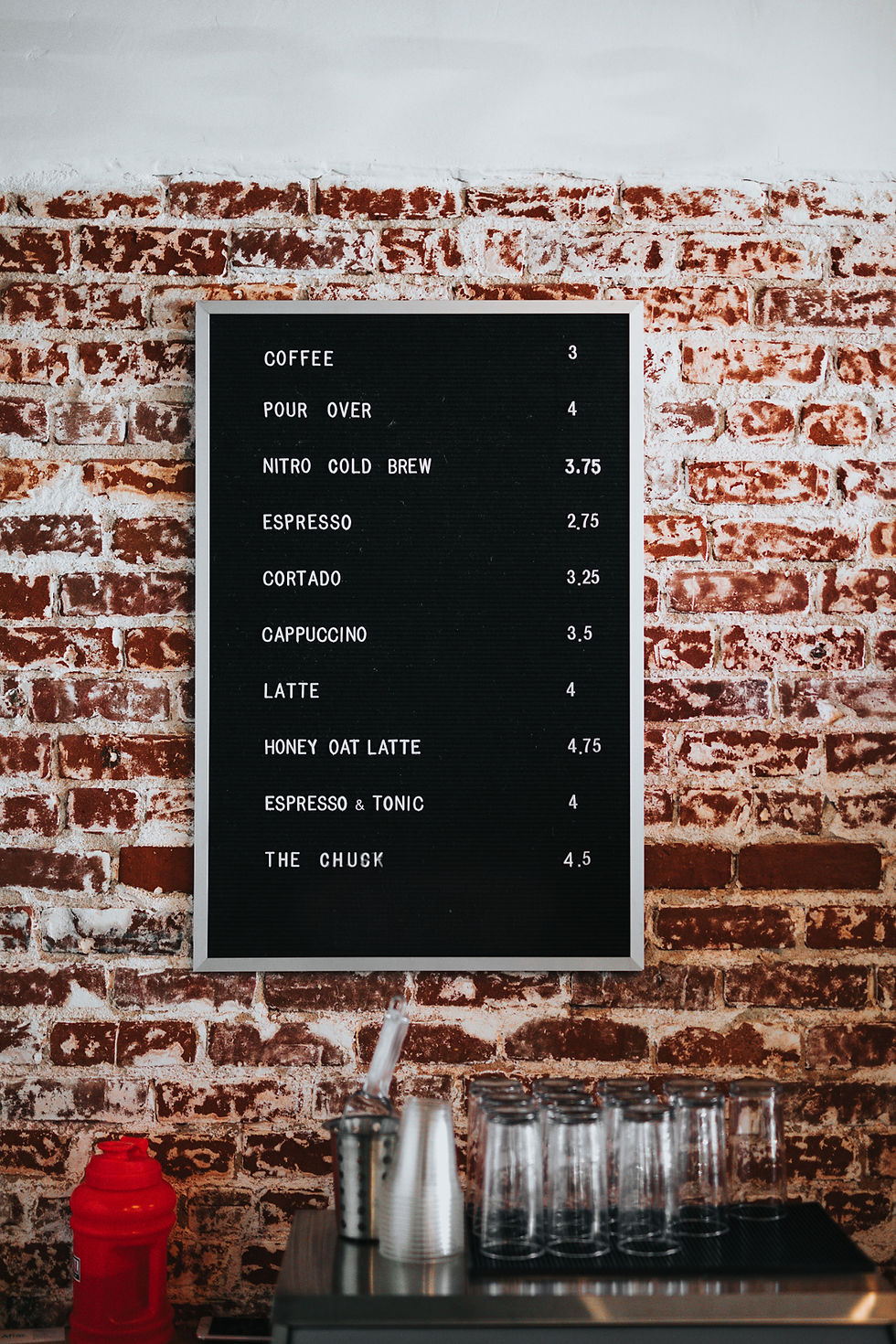
Structure information so your eye moves predictably: category → item name → price → descriptor. Place the most profitable or promoted items in the top‑left or centre areas where eyes land first. Use size, weight, and colour to differentiate tiers: largest for category headings, medium for item names, smaller for descriptions and modifiers.
Limit cognitive load by grouping related items and using clear separators or blocks. Number or label groups if the menu is long; use icons to indicate common modifiers (vegan, spicy, gluten‑free) for instant recognition. Keep pricing formats consistent (e.g. no currency symbol or aligned decimals) so customers compare options quickly.
Content Management Strategies
You will prioritise consistent templates, rapid content updates, and timed promotions to keep menu boards accurate and compelling. Implement clear workflows, defined responsibilities, and measurable rules for content changes with the help of The sign company UK.
Template Utilisation
Use a limited set of templates that map to common menu board needs: breakfast, lunch, dinner, specials, and combo offers. Keep templates modular — header area for branding, a featured slot for 1–3 high-margin items, a grid for regular items, and a footer for legal or allergen notes. This structure reduces design decisions and speeds content creation.
Standardise typography and colour variables to preserve legibility in different lighting. Define exact font sizes for headings and body text, and set contrast ratios for background and text to meet accessibility standards. Store templates as editable master files in your CMS so staff can clone and update without rebuilding layouts.
Create template rules: maximum words per item, image size limits, and price alignment. Use locked regions for brand elements and editable regions for daily items to prevent accidental changes. Version-control templates and keep a changelog so you can roll back mistakes quickly.
Real-Time Updates
Connect your menu boards system to POS and inventory feeds to automate price and availability updates. When an item sells out or a price changes, your menu boards should update within seconds to avoid customer confusion and incorrect orders.
Set thresholds and alerts in the CMS: e.g., mark an item "low stock" at 5 units and "sold out" at 0, triggering visual badges like "Limited" or "Unavailable". For urgent changes, enable manual override from a mobile app so a manager can push corrections while offsite.
Implement staged rollout for real-time changes: preview mode, approval queue, then live publish. Keep an audit trail for each change with user ID and timestamp.
Scheduling Promotions
Build a promotions calendar in your CMS that ties to dates, times, and trigger conditions (weather, inventory, footfall). Schedule recurring promotions — weekday lunch deals, weekend family bundles — and set start/end times with exact seconds to avoid overlap or gaps.
Use rules to prioritise promotions: highest margin or highest conversion should occupy the featured slot. Configure fallbacks: if a featured item is unavailable, automatically promote the next eligible offer. Test promotion combinations in a staging environment to confirm visual fit and pricing accuracy.
Track KPI tags per promotion (CTR, uplift, units sold) and attach them to each scheduled item. Analyse performance weekly to refine timing and creative. Keep promotional assets optimised: image sizes, short copy variants, and localised pricing for different sites.

Industry Applications
Menu boards help you deliver timely information, control visual branding, and improve transaction speed. They also reduce printing costs and let you tailor content for different locations, times of day, and customer segments. The sign company UK provides solutions for all types of menu board displays.
Quick Service Restaurants
You can use digital menu boards to increase order throughput and upsell higher-margin items. Place high-resolution, readable menu boards above the counter and drive-thru lanes to shorten decision time; studies show clearer visuals and concise pricing reduce order hesitation. Use scheduled playlists to push breakfast, lunch, and evening specials automatically so staff don’t need to swap static menus.
Design for legibility: large sans-serif fonts, 1.5–2.0 line spacing, and contrast ratios that work in daylight and under canopy lighting. Integrate with POS to display real-time availability, dynamic pricing, and combo suggestions. Include allergen icons and calorie counts where regulations require them to avoid service delays and compliance risks.
Corporate Environments
In corporate lobbies and cafeterias, menu boards serve both practical and cultural roles. Use them to publish daily menus, meeting-room catering options, and company announcements in a professional, brand-consistent layout. You can schedule content by location: a central cafeteria might show full meal options while kitchenettes display grab-and-go items and vending alternatives.
Connect menu boards to your internal network for centralised content management and role-based editing. Add QR codes for mobile ordering and nutrition sheets to reduce queueing. Keep graphics minimal and information hierarchy clear so employees glancing between meetings can scan options in seconds.
The sign company UK can help you implement menu boards that enhance your business, streamline updates, and keep your brand consistent across all locations.
For more inspiration and practical insights, explore our guides on Menu Boards Design and Menu Boards Digital to learn how effective layouts and modern display solutions can elevate menu performance.
Healthcare Facilities
In hospitals and clinics, menu boards must balance nutrition, safety, and accessibility. Use menu boards in patient dining areas and staff canteens to show therapeutic menus, diet restrictions, and portion guidance. Ensure staff can filter by patient dietary codes (e.g. low-sodium, diabetic) to prevent errors and speed meal assembly.
The sign company UK recommends prioritising accessibility: high-contrast menu boards, large text sizes, multilingual capability, and screen placement that accommodates wheelchairs. Integrate menu boards with dietary management systems so patient orders only display permitted items. For infection control, The sign company UK suggests sealed housings and touchless ordering via mobile or kiosks to reduce surface contact.


Comments